LightBlog

mercredi 2 décembre 2020

Xbox November 2020 update brings dynamic backgrounds, Game Pass improvements and more

Microsoft has begun rolling out the November 2020 Xbox Console Update. The update is available for the newly launched Xbox Series X and Series S gaming consoles as well as the Xbox One family of devices. The new features that are coming with the update include dynamic backgrounds, new badges optimized for Xbox Series X and Series S, the ability to preload games from Xbox Game Pass, the ability to add existing Xbox family members to a new console, and some performance improvements and bug fixes.

Dynamic Backgrounds

xbox november 2020 update dynamic wallpapers

If your Xbox home screen looks dull, then the new dynamic backgrounds should add some new life. Available for the Xbox Series X and Series S, gamers will be able to customize their home screen with motion and color. There are six new options, including homages to older-gen Xbox consoles. Microsoft may or may not add more colors and themes depending on the feedback from users in the future.

Optimized for Series X and Series S badges

xbox november 2020 update oprimised for x|s badge

With the launch of the new Xbox Series X and Series S consoles, Microsoft did not launch any new or exclusive titles. It did, however, offer over 30 games fully optimized for the new-gen consoles and a bunch of older Xbox One games has also been updated to take advantage of the increased performance of the Series X and Series S. Microsoft has now added a special X|S badge to game tiles making it easier to see which of your games have been optimized. Users can also make use of the Filter button to see only “Optimized for Xbox Series X|S” games.

Auto HDR

xbox november 2020 update auto hdr

We already know that the new Xbox consoles have the ability to run HDR games. With the latest update, both the consoles will now include an option called Auto HDR. Turning this on would “improve the visual quality of a game without changing its overall look.” The best part is, this feature doesn’t require any additional work from the developer. There will also be a new tag to let you know if the game is benefiting from this feature. Users will be able to access this when they open the guide during a game with Auto HDR running.

Pre-load games on Xbox Game Pass

The latest update is also adding a new feature for Xbox Game Pass users. Apart from viewing and adding games to your “Play later’ list, users will be able to pre-install certain games before they arrive on Xbox Game Pass. You can check upcoming games and pre-install them by heading to the Xbox Game Pass app on your console or smartphone under the “Coming soon” section. Microsoft says that all upcoming games will not be available for pre-install, but there is a feature on the smartphone app that will let you queue them to install on day one.

Adding family member accounts

xbox november 2020 update family members

The Xbox Family Settings app for Android and iOS allows users to create and add family member accounts to their Xbox console, allowing them to have full control over their usage, notifications, stats, and more. The ones who have been using the app since its launch will now be able to add family members to their console during the setup.

Xbox Insider Program

Along with the new update, Microsoft has also announced the Xbox Insider Program for Xbox Series X and Series S users. You can read more about it and register yourself by heading here.

Apart from these, the new update brings some bug fixes and performance improvements. The new update is currently rolling out for all users of the Xbox Series X, Series S, and Xbox One consoles. If you haven’t got your hands on either of the new-gen consoles, then check out our restock guide for more information.

The post Xbox November 2020 update brings dynamic backgrounds, Game Pass improvements and more appeared first on xda-developers.


from xda-developers https://ift.tt/3mwP8sq
via IFTTT

Vivo V20 Pro with Snapdragon 765G and 44MP Dual Selfie cameras launched in India for ₹29,990

Vivo managed to beat the Google Pixel 5 to the podium, as it became the first OEM to launch a smartphone with Android 11 out of the box with the launch of the Vivo V20. The smartphone made its way to India too, and now, Vivo is bringing the Vivo V20 Pro to the country, a phone whose selfie prowess we have already witnessed in our selfie camera tests.

Vivo V20 Pro Selfie Camera Tests: Justified Marketing Hype!

Vivo V20 Pro: Specifications

Specification Vivo V20 Pro
Build
  • Metallic frame
  • Matte finish on the back
Dimensions & Weight
  • 7.39mm
  • 170g
Display
  • 6.44″ FHD+ AMOLED
  • 2400 x 1080
  • Centered notch
SoC  Qualcomm Snapdragon 765G:
  • 1x Kryo 475 (ARM Cortex-A76-based) Prime core @ 2.4GHz
  • 1x Kryo 475 (ARM Cortex-A76-based) Performance core @ 2.2GHz
  • 6x (ARM Cortex-A55-based) Efficiency cores @ 1.8GHz
  • 7nm EUV process

Adreno 620

RAM & Storage 8GB RAM + 128GB storage
Battery & Charging
  • 4000 mAh battery
  • 33W FlashCharge
Security In-display fingerprint scanner
Rear Camera(s)
  • Primary: 64MP, f/1.89
  • Secondary: 8MP, f/2.2, wide-angle, 120° FoV, 2.5cm macro
  • Tertiary: 2MP, f/2.4, monochrome
Front Camera(s)
  • Primary: 44MP, f/2.0, autofocus
  • Secondary: 8MP, f/2.28, wide-angle, 105° FoV
Port(s) USB Type-C
Audio
  • AI Noise Cancelling for Video Calls
Connectivity
  • 5G
Software Funtouch OS 11 based on Android 11
Other Features
  • Vapor Chamber Liquid Cooling

The highlight of the Vivo V20 Pro are three fold — it comes with the Qualcomm Snapdragon 765G SoC, which is one of the better SoCs around for a mix of performance and price; it claims to be the thinnest 5G smartphone in the segment; and it has a powerful front camera setup. This combination makes the device an ideal choice for users who focus on content creation with the front camera, which can range from influencers to other content creators who need a good front camera for their daily needs. The 44MP “Eye Autofocus” camera actually produces results that justify the marketing around it. In our testing, we found the Vivo V20 Pro to produce sharper, better lit, and better-balanced selfies than other competing phones such as the Galaxy Z Fold 2 and the iPhone 11 Pro. The front camera also enables features such as 4K video recording at 60fps, and slow-motion selfie videos.

The rest of the package is also decent. The Snapdragon 765G is a tried-and-tested formula at this stage, and the 6.44″ FHD+ AMOLED display should work well for most users. The rear camera also has good specifications, though one can always argue on the practical utility of 2MP auxiliary camera sensors. The battery is a decent 4000 mAh despite the thin profile of the phone, and the 33W FlashCharge fast charging can get you from 0-60% in 30 minutes.

Pricing and Availability

The Vivo V20 Pro will be available in India in Midnight Jazz and Sunset Melody colors, and in a single 8GB + 128GB configuration for ₹29,990 (~$407). The phone is already on sale across online stores such as Vivo’s website, Flipkart, Amazon.in, PayTM Mall, Tata Cliq, as well as offline stores such as Vivo Exclusive Stores, Croma, Reliance Digital, Vijay Sales, Poorvika, Sangeetha, and more. Customers can get ₹2,000 instant cash back on ICICI Bank Debit and Credit cards on online stores, and 10% cashback on ICICI Bank Debit and Credit cards and Bank of Baroda Credit Card on offline stores.

The post Vivo V20 Pro with Snapdragon 765G and 44MP Dual Selfie cameras launched in India for ₹29,990 appeared first on xda-developers.


from xda-developers https://ift.tt/39yzAB1
via IFTTT

mardi 1 décembre 2020

Latest WhatsApp update brings advanced wallpaper features and improved sticker search

A few weeks ago, WhatsApp started testing a couple of new features in a recent beta release. These included a new option to mute videos before sharing, a Read Later feature to keep archived chats separate from the main conversation screen, and several advanced wallpaper customization options. With its latest update on the stable channel, WhatsApp has now started rolling out the advanced wallpaper customization options to some users.

As per a recent report from The Verge, the new wallpaper customization options include the ability to set different custom wallpapers for each chat, color variants of the original doodle wallpaper, several new nature and architecture wallpapers, and an option to set different wallpapers for light and dark mode.

Talking about the new wallpaper customization features, WhatsApp said:

“Make your chats personal and distinguishable by using a custom wallpaper for your most important chats and favorite people, and you never need worry about sending the wrong message in the wrong chat ever again.”

Along with the new wallpaper customization options, the latest WhatsApp update includes improvements for sticker search. Thanks to this, users will now be able to search for stickers with text or emoji and even browse through common stickers categories. To ensure that the sticker search feature works as intended, the Facebook-owned messenger has urged sticker creators to tag their stickers with emoji and text moving forward.

Finally, the World Health Organization’s “Together at Home” sticker pack is now available as animated stickers in the latest update. The sticker pack is available with text localized for 9 languages, including Arabic, French, German, Indonesian, Italian, Portuguese, Russian, Spanish, and Turkish.

According to Facebook, the latest WhatsApp update with all the aforementioned features is expected to reach both Android and iOS users this week. However, the update wasn’t available on any of our devices at the time of writing.

The post Latest WhatsApp update brings advanced wallpaper features and improved sticker search appeared first on xda-developers.


from xda-developers https://ift.tt/36ow9dW
via IFTTT

Lenovo Legion 5 with AMD Ryzen 5 4600U processor launched in India

Lenovo has introduced the Legion 5 gaming laptop in India. The company already sells the Gaming 3i, Legion 5i, and Legion 7i, all of which are powered by the 10th-gen Intel mobile processors. With the launch of the new model, Lenovo now has an AMD Ryzen-powered option for gamers. We recently featured this notebook as one of the best affordable gaming laptops that you could buy this year. As of now, Lenovo is only offering the base variant of the Legion 5 in India that includes the Ryzen 5 4600H processor.

The Legion 5 is priced at ₹75,990 ($1,030) although the price is listed as ₹79,990 ($1,080) on the official Lenovo India website for the Phantom Black color option. The notebook follows the same design language as we saw on the Legion 7i, but does not include the flashy RGB lighting. Lenovo is also offering a one-year free Premium Care and one-year of Accidental Damage Protection for the legion 5 at 3,900 ($53). You can get the laptop from Lenovo.com and Lenovo Exclusive Stores. Lenovo also promises that the laptop will be made available across other online partner platforms and retail stores, soon.

The gaming notebook features a 15.6-inch IPS anti-glare display having a Full-HD resolution (1920 x 1080 pixels) with a 120Hz refresh rate. As mentioned above, it is powered by the AMD Ryzen 5 4600H processor which is a six-core processor with 12-threads and a clock speed of 3GHz with a max boost speed of up to 4GHz. There is 8GB of DDR4 RAM clocked at 3200MHz and for graphics, it features the NVIDIA GeForce GTX 1650 Ti having 4GB of GDDR6 memory. For storage, you get a 256GB M.2 PCIe 3.0×4 NVMe SSD as well as a 1TB HDD. As for ports and connectivity you get four USB 3.2 Gen 1 Type-A ports, one USB 3.2 Gen 1 Type-C port, an Ethernet (RJ-45), and a headphone/microphone combo jack. The notebook also comes with standard Wi-Fi 6 and Bluetooth 5.0.

Lenovo says that the notebook will offer a battery life of 8 hours with its ‘Hybrid Mode.’ Considering the AMD chipset is based on the 7nm node, we don’t believe that the results would be far from the claims. You also get Lenovo’s TrueStrike keyboard with white backlit keys along with Rapid Charge Pro for fast battery charging. The 720p webcam comes with a shutter slider that lets you shut the camera lens for extra privacy.

The post Lenovo Legion 5 with AMD Ryzen 5 4600U processor launched in India appeared first on xda-developers.


from xda-developers https://ift.tt/3lxVff2
via IFTTT

Instagram Live Rooms allows creators to add 3 users to a Live session

Instagram has become the de-facto platform for influencers and content creators, thanks to its tighter focus on photo and video sharing as a service. But COVID has changed how we create and consume content, with focus now turning towards shared Live experiences and interactions. Video calls are now the norm for personal calling, and multi-person virtual conferences the norm for events. Instagram is consequently adapting its Live strategy, as it is now allowing creators to add up to three additional people in Live Sessions through Live Rooms.

Instagram’s newest feature is called Live Rooms. Simply put, it is an extension of the existing Live functionality, with the flexibility of adding two more people in the session than previously allowed. Live sessions can now feature four people in the same window, allowing for greater flexibility in the topics that can be explored in these sessions. Previously, a Live session could hold only the creator and one additional guest — and if you need to add anyone else, you would need to remove the guest previously added.

Live Rooms was tested with a few creators in India, and the multi-participant video chat format received praise from them. Rollout for Live Rooms has begun and will soon be available to everyone in India and Indonesia. Instagram did not mention if and when this feature will be rolled out to the rest of the world, but we reckon global rollout will follow soon as well, as it did for features like Vanishing Mode and BTS Theme.

How to use Instagram Live Rooms

To go live on Instagram:

  • Tap the plus sign in top left hand corner of your stories tray or click the “Create” plus icon in the top right of home navigation bar
    • Note: you can also swipe left when you’re on your main Instagram home screen!
  • Scroll to and tap the Live camera option at the bottom
  • Use the menu on the left to add a title if you so choose
  • Tap the circular button to go live

To add guests to your live stream:

  • While you’re already live, tap the Camera/Rooms icon
  • Now, you’ll see people that have requested to join your live. You can also search for your guest’s name to send them a request to join your live.
  • Simply tap on the guest’s handle to add them
  • You can add all three guests at one time, and you can also add guests at a later time

Instagram (Free+, Google Play) →

The post Instagram Live Rooms allows creators to add 3 users to a Live session appeared first on xda-developers.


from xda-developers https://ift.tt/39scqMB
via IFTTT

The Huawei Watch GT 2 Pro, Honor Watch GS Pro, and Honor Watch ES are the best of LiteOS yet

I’ve been a rather open critic of LiteOS in the past, and I think from even my most recent coverage of the Huawei Watch GT 2e, it’s clear that a lot of its issues haven’t really been rectified in my eyes. Having said that, it’s not that LiteOS isn’t feature-packed, but rather that the features it packs aren’t really the kind that I value in a smartwatch. Huawei and Honor both launched their own wearables in the past month — Huawei launched the Huawei Watch GT 2 Pro at HDC 2020, while Honor launched both the Honor Watch GS Pro and the Honor Watch ES at this year’s rather scaled-back IFA 2020. We’ve gotten to use all three, and I must say, I’m a fan.

Specifications

Specifications Huawei Watch GT 2 Pro Honor Watch GS Pro Honor Watch ES
Dimensions & Weight
  • 46.7 x 46.7 x 11.4 mm
  • 52g
  • 45.5g
  • 21g
Display
  • 1.39″ Super AMOLED
  • 454 x 454 resolution
  • Sapphire Glass
  • 1.39″ Super AMOLED
  • 454 x 454 resolution
  • Glass
  • 1.64″ AMOLED
  • 280 x 456 resolution
  • Glass
Watchband options
  • Black Fluoroelastomer
  • Gray Brown Leather
N/A N/A
Internal Storage 4GB 4GB 4GB
Connectivity
  • GPS
  • Bluetooth v5.1 BLE
  • GPS
  • Bluetooth v5.0 BLE
  • Bluetooth v5.0 LE
Other features
  • Speaker
  • Wireless charging
N/A N/A
Sensors
  • Accelerometer
  • Gyroscope
  • Geomagnetic
  • Ambient light
  • Optical heart rate
  • Air pressure
  • SpO2
  • Accelerometer
  • Gyroscope
  • Geomagnetic
  • Optical heart rate
  • Air pressure
  • SpO2
  • Accelerometer
  • Gyroscope
  • Optical heart rate
  • SpO2
Battery 455mAh 790mAh 180mAh
Durability
  • 5ATM water resistance
  • 5ATM water resistance
  • MIL-STD-810G compliant
  • 5ATM water resistance
OS Huawei LiteOS Huawei LiteOS Huawei LiteOS
Colors
  • Night Black
  • Nebula Gray
  • Charcoal Black
  • Marl White
  • Camo Blue
  • Meteorite Black
  • Coral Pink
  • Icelandic White

About this article: The Huawei Watch GT 2 Pro was received for review for my own website, IrishTech.ie, while the Honor Watch GS Pro and the Honor Watch ES were received for review at XDA-Developers. Neither Huawei nor Honor had any input in the contents of this review.


Design and Comfort

Huawei Watch GT 2 Pro

The Huawei Watch GT 2 Pro features the most premium design of these three smartwatches, offering a traditional watch look and a sapphire glass front. The top is entirely flat, with ceramic glass underneath and a comfortable, fluoroelastomer strap. This is a comfortable watch to wear and looks the most stylish as well. I keep an always-on display enabled for the traditional watch look which adds to the experience, though you’ll take a battery hit by doing so. This one does get uncomfortable sometimes, but I can generally wear it with ease for hours on end.

Honor Watch GS Pro

The Honor Watch GS Pro also features a regular watch-like design. However, it’s incredibly bulky and uncomfortable to wear over long periods of time. It’s heavy as well. This is not the smartwatch to wear if you want something fashionable, though it’s clearly built to last and certainly doesn’t look bad. However, this will definitely not be everyone’s favorite design. I don’t know why, as it’s lighter than the Watch GT 2 Pro, but this watch feels uncomfortable and heavy on the wrist after only a few hours. I think it’s as a result of its bulk that I found myself taking it off rather frequently for a few minutes at a time. It’s not a huge issue, but it’s something to keep in mind and is to be expected from a bulky smartwatch.

Honor Watch ES

The Honor Watch ES has a rather unique design, taking the shape of a small, slightly curved, lightweight rectangle on the wrist. The overall OS and watchfaces have been adjusted to fit, and it’s definitely the most one of my favourites of the trio, While I prefer the Huawei Watch GT 2 Pro for its traditional watch-like design, the Honor Watch ES is the runner-up for its premium and unique look. The Honor Watch ES is the most comfortable of the three – light and small, you can entirely forget that it’s even there. I was able to wear it for days on end.

Software Features: LiteOS

Pretty much all three of these smartwatches offer the same features in different form-factors. The only real difference between all three is that the Honor Watch ES lacks GPS support. Even then, it can connect to your smartphone and use the GPS data from that, and if I’m honest, I don’t really ever just take my smartwatch with me somewhere. I understand that there are people who do, but I imagine that’s a rather niche use-case. All three of these devices can automatically detect workout activity and will offer to start tracking it for you.

Lack of GPS aside, all three of these smartwatches offer the bare minimum that a smartwatch should. Heart-rate tracking, accurate sleep tracking, and SpO2 monitoring for blood oxygen levels are the three mainstays of any LiteOS smartwatch, and none of them have been left out. There’s menstrual cycle tracking on all three devices too, alongside other choice-features such as a compass, alarms, a timer, and a weather report.

You can also enable notifications in the Huawei Health app too. The Huawei Health app is a must-have on your smartphone to set-up and configure all of these devices, and it also allows you to view your information. The latest version of the Huawei Health app can be downloaded from the Huawei AppGallery. You can no longer download newer versions from the Google Play Store, and a newer version is required to set these devices up.

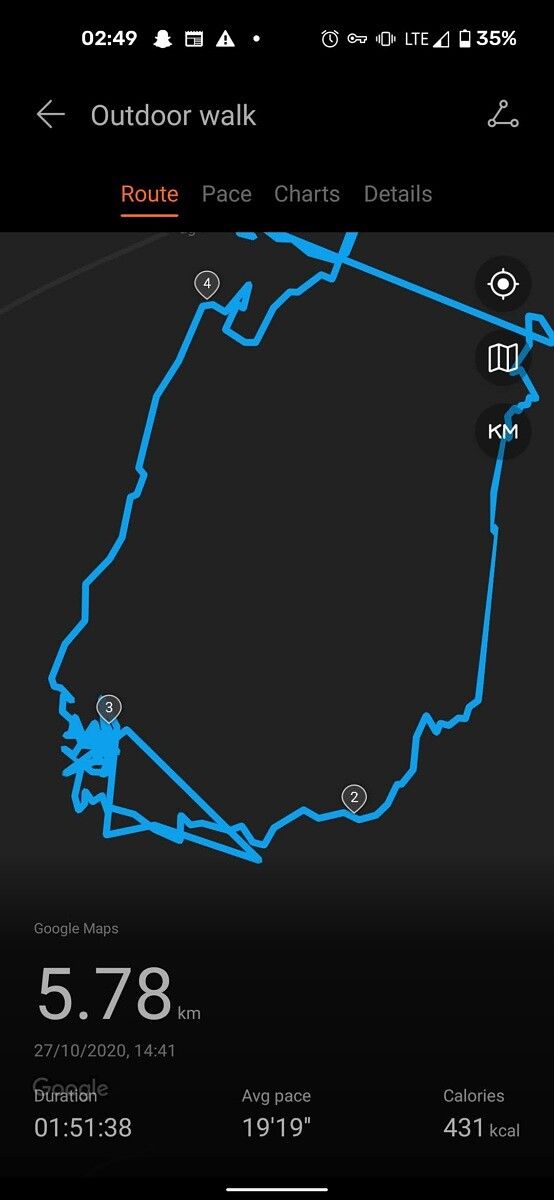
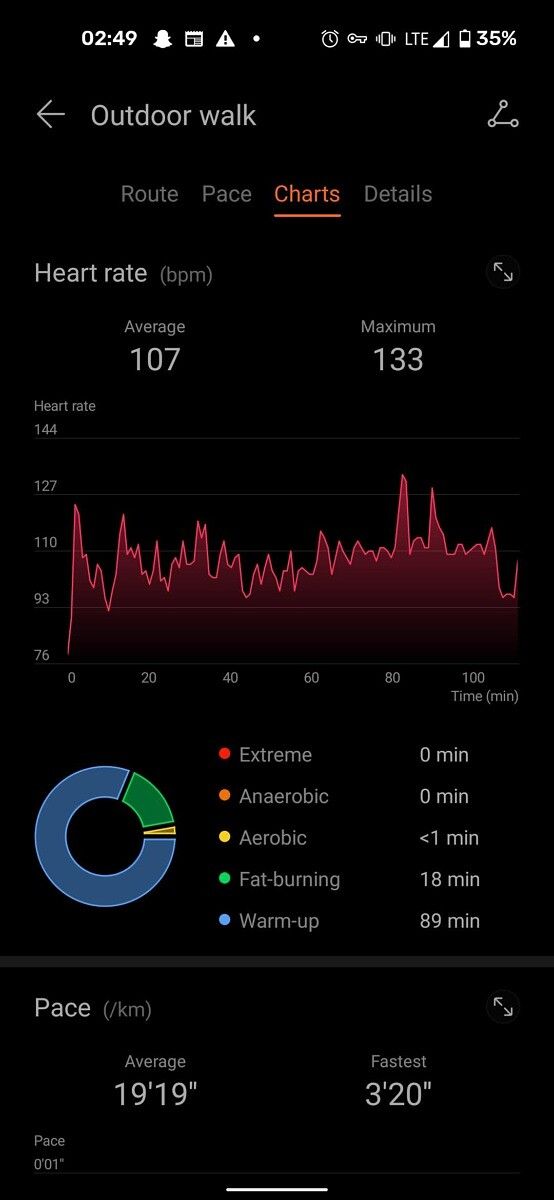
The screenshots above show the Huawei Health app in action and the data that it provides. You can view in-depth data from your walks, about your sleep, and more. I still maintain that the stress monitor is absolutely useless, but the rest of the features are fun and incredibly useful. I make use of the sleep tracker a lot to try (and admittedly fail) to maintain a sleeping pattern.

The walk that I went on was a rather slow walk, but I could see that the GPS on the Huwaei Watch GT 2 Pro was extremely accurate. This wasn’t too surprising, but it’s good to know that you can rely on it for accurate tracking. By the way, the Watch GT 2e review also goes a lot more in-depth about LiteOS if you want to check it out. The Honor Watch GS Pro was just as accurate, and I can easily recommend either of them for GPS tracking. In the case of the Honor Watch ES, that will just use your smartphone for tracking.

To summarise LiteOS — it has some nice ideas and works pretty well, however, the lack of apps is a killer. I understand that LiteOS smartwatches are not meant to be anything more than basic trackers, but they’re quite expensive despite that.

Unique Hardware Features

The unique hardware features of all three of these devices are where they truly stand out from each other. They all offer the same basic experience, but they are undoubtedly for three different types of people.

Huawei Watch GT 2 Pro

I’ll start with the Huawei Watch GT 2 Pro. This is the most premium of the three (with a premium price tag of €299), and it offers the most comprehensive experience. It has wireless charging for a start (rather than pin connectors), and there is both a speaker and an ambient light sensor too. I make use of the wireless charging capabilities quite frequently, which is nice and much easier than using a dedicated pin charger. It’s much easier to just take it off while I’m working at my desk. Given how infrequently I have to charge it, it always bothered me that for convenience, I needed to have a pin charger plugged in at all times, taking up a charging port, just to be used a couple of times a month.

As for the speaker, it’s not the best speaker in the world, but I was actually impressed that the audio was listenable considering how poor the speaker was on the Watch GT 2e. I still wouldn’t recommend using it all really (a talking watch will get you a few stares out in public) but it’s nice to have the hardware if you want to use it, I guess. It also features a sapphire glass front and Bluetooth v5.1, for all that that really matters.

Honor Watch GS Pro

The Honor Watch GS Pro went through 14 different MIL-STD-810G tests, including temperature-humidity-altitude resistance, salt spray, sand resistance, and humidity resistance. In other words, if durability is what you’re after, the Honor Watch GS Pro is definitely built like a tank. Because of that though, it can get uncomfortable to wear over long periods of time, which leads to me taking it off every now and again for a bit. I’m also a bit confused as to why it uses regular glass for the front rather than sapphire glass as well, given that it’s built to be rugged. Nevertheless, this watch is a fantastic choice for anyone who goes against the elements often. What’s more, this watch lasts 25 days on a single charge. You’ll get 48-hours of straight GPS usage out of it. This is a little bit cheaper than the Huawei Watch GT 2 Pro, coming in at €249.

Honor Watch ES

The Honor Watch ES doesn’t really offer much by way of unique features, but that’s the beauty of it. It’s a relatively inexpensive alternative to the other two smartwatches on offer, yet provides the basic experience of the other two for the everyday user. I don’t really care about a lot of the extra features of the other smartwatches, and for style points, the Honor Watch ES is my favorite of the three. It comes in at €99, much cheaper than the competition.


Conclusion

All of these smartwatches have their own merits, and I can recommend them all for different reasons. Want something a little bit on the lighter (and cheaper) side? The Honor Watch ES would be my go-to here. Want to go hiking? The Honor Watch GS Pro is the best. Finally, if you want the best of the best for everyday usage, you can’t go wrong with the Huawei Watch GT 2 Pro. It’s still LiteOS which can lack at times, however, these watches are the best of LiteOS yet.

    Huawei Watch GT 2 Pro

    The best of the best

    The Huawei Watch GT 2 Pro packs the best of LiteOS, offering the most complete hardware package of any LiteOS smartwatch yet.
    Honor Watch GS Pro

    The rugged watch

    Want something to withstand the elements as you go hiking with a seemingly-endless battery life? The Honor Watch GS Pro is the watch for you.
    Honor Watch ES

    The sleek one

    Looking for something small, comfortable, but still a bit fancy? The Honor Watch ES is small, light, relatively inexpensive, and still packs in loads of useful features!

The post The Huawei Watch GT 2 Pro, Honor Watch GS Pro, and Honor Watch ES are the best of LiteOS yet appeared first on xda-developers.


from xda-developers https://ift.tt/36rvSXC
via IFTTT

Nintendo Switch’s latest update finally brings along a better way to share screenshots

A new firmware update is rolling out for the Nintendo Switch that introduces a new way to share screenshots. Once you have updated to the latest firmware version 11.0.0, you will be able to share them with your smartphone by scanning a QR code. Clearly, that isn’t a straightforward method, but it sounds way better than how it currently allows users to only upload to their social media accounts on either Twitter or Facebook.

Here’s how you can share screenshots from your Nintendo Switch:

  • From the Home Menu select Album, then select the screenshot or video capture you want to share.
  • Select Sharing and Editing, then select Send to Smartphone.
  • Select Only This One or Send a Batch.
  • Using the camera on your smartphone, scan the QR code displayed on the Switch.
  • Once the connection is established, the screenshots and/or videos will be sent to the smart device and the thumbnail(s) will be displayed on the smartphone.
  • Up to 10 screenshots and 1 video capture can be transferred wirelessly at one time.

The new update (via TheVerge) also brings a new feature that automatically downloads backed up save data. In this case, if you have a Nintendo Account linked to multiple systems, the saved data backed up from one console will automatically be downloaded to your other system(s). There is also a new “Trending” section that has been added to the user page which gives you information about what your friends have been playing. Apart from these, the Nintendo Switch Online service will now be available on the home screen, users will now have the ability to prioritize downloads and 12 new user icons have been added to celebrate the 35th anniversary of Super Mario Bros.

Best comfort grips for your Nintendo Switch and Nintendo Switch Lite

Nintendo Switch firmware update 11.0.0 changelog

  • Nintendo Switch Online was added to the HOME Menu.
    • Access all Nintendo Switch Online services, from getting the latest information to checking your membership status.
      *This feature is not available in some countries/regions.
  • A new feature that automatically downloads backed up save data was added to the Save Data Cloud.
    • When using software with the same Nintendo Account linked to multiple systems, save data backed up from one console will automatically be downloaded to your other system(s).
      *To use this feature, it must be enabled under System Settings > Data Management > Save Data Cloud.
      *Save data will not be downloaded automatically unless save data for that software exists on the console. The first time only, users must download the save data manually.
      *A Nintendo Switch Online membership is required to use the Save Data Cloud service.
  • A new Trending feature was added to the User Page.
    • Users can check what software their friends are playing or have started playing recently.
    • Information will not be displayed for friends who have their online status set to display to no one.
  • Users can now transfer screenshots and videos from Album to their smart devices.
    • Users can wirelessly connect their smart devices to Nintendo Switch to transfer the screenshots and videos saved within their Album.
    • For screenshots, users can transfer a maximum of 10 screenshots and 1 video capture at once.
      *To connect, users must use their smart device to scan the QR Code displayed on the Nintendo Switch screen
  • A new Copy to a Computer via USB Connection feature was added under System Settings > Data Management > Manage Screenshots and Videos.
    • Users can use a USB cable to connect Nintendo Switch to their computers to copy the screenshots and videos saved under Album.
      * A USB charging cable [model HAC-010] or a USB-IF certified USB cable that supports data transfer is required to connect to a computer.
    • For more information, please refer to the Nintendo Support website.
      * Connection via the Nintendo Switch dock is not supported. Please connect the Nintendo Switch system directly to the computer.
  • Users can now select what download to prioritize when there are multiple downloads in progress.
    • When there are multiple software, update data, or downloadable content downloads in progress, users can now select which they want to download first.
    • You can set this under Download Options by selecting the icon for the software you want to download first on the HOME Menu.
  • User icons were added.
    • 12 user icons that commemorate the 35th anniversary of the Super Mario Bros. series were added.
  • Users can now name preset button mappings with the Change Button Mapping feature.
  • Brazilian Portuguese was added as a supported language.
    • When users set their region to the Americas and their language to Português, the language used on the HOME Menu and in certain software will be displayed in Brazilian Portuguese.
  • Several issues were fixed, and usability and stability were improved.

The post Nintendo Switch’s latest update finally brings along a better way to share screenshots appeared first on xda-developers.


from xda-developers https://ift.tt/36pY90T
via IFTTT