LightBlog

mardi 3 novembre 2020

WhatsApp’s new storage management tool lets you bulk delete annoying image forwards

WhatsApp started testing a redesigned Storage Usage section in a beta release (v2.20.201.9) earlier this year in September. The updated Storage Usage section featured a new UI with a bar at the top to show current storage usage, a “Suggested clean up” section that listed forwarded and large files that could be removed to save space, and a section with a list of all the chats that occupied the most storage space on your device. Now, WhatsApp is finally releasing the feature on the stable channel with a few minor changes.

As per a recent tweet from WhatsApp, the redesigned Storage Usage section is rolling out to users with the latest stable update. To access the section, you’ll first need to update to the latest version of the app from the Play Store link below. Once you have the update installed, you’ll have to navigate to the app settings by tapping on the three-dot menu icon in the top left corner and selecting the Settings option.

Here, you’ll have to tap on the Storage and data option and select the Manage storage option in the following window. As seen in the beta release, the new storage usage section features a bar at the top that shows the total used storage, the amount of storage occupied by WhatsApp media on your device, the storage occupied by apps, and other items the amount of free storage.

The “Suggested clean up” section that we saw in the beta release has been renamed to “Review and delete items”; however, it serves the same purpose. The section includes two options, one for media that has been forwarded many times and the other for files that are larger than 5MB. Tapping on either of these options opens up the respective media in a gallery where you can quickly select and remove them from your device. The last section remains the same, and it shows a list of chats occupying the most space on your device.

WhatsApp Messenger (Free, Google Play) →

The post WhatsApp’s new storage management tool lets you bulk delete annoying image forwards appeared first on xda-developers.


from xda-developers https://ift.tt/3839W6F
via IFTTT

Google to use AV1 codec to improve bandwidth for Stadia, Photos, Meet, and TV

The Alliance for Open Media came out with the royalty-free AOMedia Video 1 (AV1) codec back in 2017 to replace H.264 as the primary codec for online streaming and media consumption. The AV1 codec offered around 30% better compression than Google’s previous VP9 standard without hampering picture quality. Since its release, the AV1 codec has been adopted by several services and platforms, including Google Chrome, Android, YouTube, Netflix, Vimeo, and Facebook. Recently, Microsoft also announced that it was bringing hardware-based AV1 codec support to Windows 10. Now, in a recent panel discussion on the codec’s commercial readiness, Matt Frost from Google has revealed that the company will soon bring AV1 support to Stadia, Photos, Meet, and TV.

During the panel discussion, Frost revealed that the AV1 codec has already been deployed in several of the company’s platforms and services, including Google Duo, YouTube, Chrome, and Android. Going forward, the company plans to deploy AV1 support to “the whole range of Google’s video applications and services.” Although Frost didn’t explicitly mention the names of the applications and services that will get AV1 codec support in the near future, a slide shown during the discussion highlighted that AV1 support will soon make its way to Google Photos, Meet, Stadia, and TV. Sadly, the discussion didn’t highlight how and when Google plans on deploying AV1 support on the aforementioned services.

Along with Google, the panel discussion included representatives from Intel, Amazon, Facebook, Netflix, and Tencent, who talked about how the respective companies plan on deploying AV1 support to their various products and services. If you’re interested in learning more about AV1 commercial deployment, you can check out the panel discussion by following the link below. Do note that you will have to create an account on IBC in order to watch the discussion. To learn more about the AV1 codec, you can check out our detailed explainer by following this link.


Source: IBC Showcase

The post Google to use AV1 codec to improve bandwidth for Stadia, Photos, Meet, and TV appeared first on xda-developers.


from xda-developers https://ift.tt/2TNZzLv
via IFTTT

Micromax IN Note 1 and IN 1B mark the return of Micromax to the Indian smartphone market

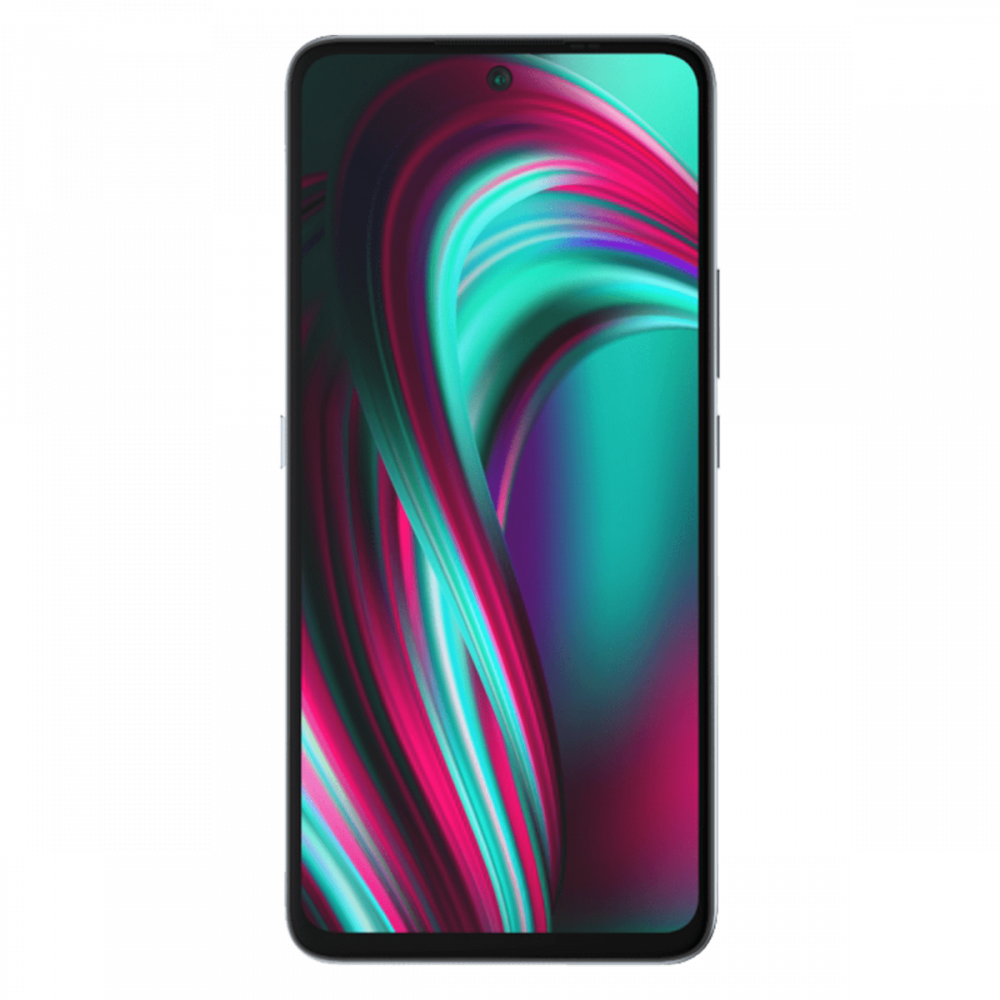
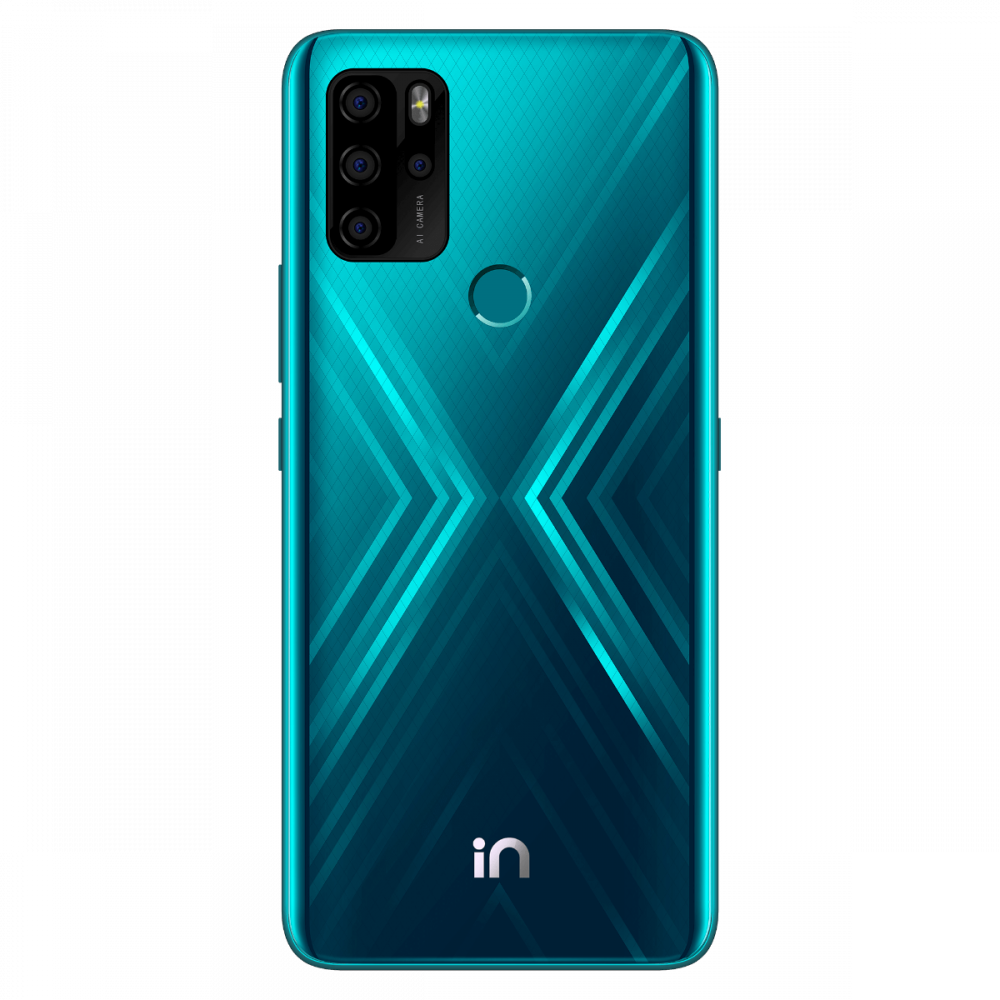
Micromax today launched two new Android smartphones in India: Micromax IN Note 1 and IN 1B, marking a re-entry of the Gurugram-based OEM into the Indian smartphone market. The new smartphones boast interesting hardware, including a quad-camera array, a 5,000 mAh battery, MediaTek Helio G series chipset, and reverse charging support.

Micromax IN Note 1 and IN 1B Specifications:

Specifications IN Note 1 IN 1B
Dimensions and Weight NA NA
Display
  • 6.67-inch IPS, FHD+
  • 21:9
  • 450nits
  • Centered hole-punch
  • 78% NTSC
  • 6.52-inch HD+
  • Waterdrop notch
SoC
  • MediaTek Helio G85
  • ARM Mali G52 MC2 GPU
  • MediaTek Helio G35
  • IMG PowerVR GE8320 GPU
RAM and Storage
  • 4GB + 64GB
  • 4GB + 128GB
  • 2GB + 32GB
  • 4GB + 64GB
Battery & Charging
  • 5,000mAh
  • 18W fast charger
  • Reverse charging support
  • 5,000mAh
  • 10W charger
  • Reverse charging support
Rear Camera
  • 48MP primary
  • 5MP ultra-wide, 115-degree
  • 2MP macro sensor
  • 2MP depth sensor
  • 13MP primary
  • 2MP depth sensor
  • 960fps video support
Front Camera 16MP front shooter 8MP front shooter
Connectivity
  • Dual-band Wi-FI
  • 4G LTE
  • Bluetooth 5.0
  • Dual SIM
  • Type C
  • 3.5mm jack
  • MicroSD card
  • 4G LTE
  • Type C
  • Bluetooth 5.0
  • 3.5mm jack
  • Dual SIM
  • MicroSD card
Other feature
  • Dedicated Google Assistant key
  • Rear-mounted fingerprint scanner
Software Android 10 Android 10

Micromax IN Note 1

The Micromax IN Note 1 is the more powerful of the duo, packing a 6.67-inch FHD+ IPS screen with a centered hole-punch on the front and a square camera module on the back. The quad-camera system is comprised of a 48MP primary camera, a 5MP ultra-wide, 2MP macro, and 2MP depth sensors. On the front, there’s a 16MP wide-angle selfie camera with a 78-degree field-of-view. The phone is powered by a MediaTek Helio G85 chipset, coupled with Mali G-52GPU and up to 4GB of RAM and 128GB of storage. The phone packs a 5,000 mAh battery and comes with an 18W fast charger and reverse charging support. The phone runs a near-stock version of Android 10, and Micromax is promising “two years” of Android updates.

Micromax In Note 1 green front Micromax In Note 1 green

Micromax IN 1B

The Micromax IN 1B, on the other hand, is an entry-level device. It sports a 6.52inch display and packs a MediaTek Helio G35 chipset, featuring 8x ARM Cortex-A53 cores clocked at 2.3GHz. In terms of camera, the Micromax IN 1B has a 13MP primary sensor, 2MP depth sensor, and an 8MP selfie camera. Just like its bigger brother, the IN 1B packs a 5,000 mAh battery but comes with a slower 10W charger. The phone runs a near-stock version of Android 10, and Micromax is promising “two years” of Android updates.

Micromax In 1B Purple front Micromax In 1B Purple


Pricing & Availability

The Micromax IN Note 1 is priced at ₹10,999 ($147) for the base 4GB/64GB variant, while the top 4GB/128GB variant will cost ₹12,499 ($168). Meanwhile, the entry-level Micromax IN 1B starts at ₹6,999 (~$94) for the 2GB/32GB model and ₹7,999 (~$107) for the 4GB/64GB variant. Both phones are available for pre-order today and will be exclusively available from Flipkart. The IN Note 1 will go on sale on Nov. 24, followed by the IN 1B on Nov. 26.

The post Micromax IN Note 1 and IN 1B mark the return of Micromax to the Indian smartphone market appeared first on xda-developers.


from xda-developers https://ift.tt/35Ufk9o
via IFTTT

lundi 2 novembre 2020

Samsung S Translator service will be shut down next month

After discontinuing some of Bixby Vision’s augmented reality features last month, Samsung has now announced that it will shut down its S Translator service next month. Much like the Bixby Vision announcement, Samsung is now sending out in-app notices to South Korean users announcing its plans to discontinue its in-house translation service.

The notice states that the S Translator service will be shut down on December 1, 2020, and Samsung will promptly delete all personal information collected by the service. In the notice, the company also thanks S Translator users for showing interest in the service and using it over the last few years. For the unaware, the S Translator service came pre-installed on several flagship Galaxy devices and offered language translation between 11 languages: Brazilian Portuguese, English (UK), English (US), French, German, Italian, Japanese, Korean, Russian, Simplified Chinese, and Spanish.

Samsung S Translator shutdown notice

Although Samsung is shutting down S Translator, Galaxy users already have access to an alternative translation service in the form of the company’s voice assistant Bixby. The voice assistant can translate text from one language to another, it supports a larger number of languages, and it offers a significantly better user experience than the outgoing service. On top of that, Bixby also supports live translation that makes use of your device’s camera to instantly translate any text you see around you from one language to another.

In case you don’t wish to use Samsung’s virtual assistant for your translation needs, you can also use Google Translate from the Play Store. The app features a ton of useful features to help with translations, including a real-time transcription feature that will help you have a conversation with someone who doesn’t speak the same language as you.


Via: TizenHelp

The post Samsung S Translator service will be shut down next month appeared first on xda-developers.


from xda-developers https://ift.tt/3621rpN
via IFTTT

You can now run some x86-64 Windows apps on Windows 10 on ARM via Hangover

If you’ve woken up from the weekend, with a bad hangover, you can take comfort in a good Hangover instead. Users of devices running PowerPC or ARM64 devices, rejoice – your prayers have been answered, as you can now run a range of Windows x86/x64 apps on your machine, thanks to Hangover’s latest Alpha release. For the uninitiated, Hangover is a WINE-based virtualization platform, originally set up to explore ways of creating compatibility between 64-bit ARM-powered devices and their x86-based cousins. Now, thanks to a collaboration with Raptor Computing Systems, it is using the technology to create a similar solution for PowerPC.

The solution works by running WINE 64-bit on the host, coupled with an especially adapted QEMU instance, and a whole bunch of “thunk” libraries to stitch it all together. The result is a virtualized version of your favorite Windows apps – though that promise comes with a massive caveat.

Although progress is still ongoing, there’s a surprising amount it can already do, even basic 3D rendering and Direct3D if you have OpenGL installed. However, if you need something that you can rely on for every Windows app you throw at it, this really isn’t for you. It may be one day, but this, by the developers’ own admission, is a very Alpha-y Alpha and isn’t ready to be relied on as an alternative to a Windows-native PC yet. Hangover now allows Windows x86/x64 apps to run on ARM 64, PPC64LE, x86_64 – but all very much ‘in theory’ – your results may differ. Users may note that Android support has been removed in this build. That may come as a disappointment, but it hasn’t worked properly for a while and it seems the developers have decided to disable it for the present and the foreseeable future.

For more information, and to download the Hangover Alpha, click the source link to be taken to the GitHub repository.


Source: Github/AndreRH
Story Via: Phoronix

The post You can now run some x86-64 Windows apps on Windows 10 on ARM via Hangover appeared first on xda-developers.


from xda-developers https://ift.tt/34PnTD5
via IFTTT

Here’s when the LG Wing lands on AT&T and T-Mobile in the U.S.

After debuting on Verizon in September this year, the LG Wing is finally making its way to AT&T and T-Mobile users in the US. The innovative device, which features a swiveling display and a gimbal camera, will be available for T-Mobile and AT&T customers starting November 6th.

LG Wing: Specifications

Specification LG Wing 5G
Dimensions & Weight
  • 169.5 x 74.5 x 10.9 mm
  • 260g
Display
  • Main Display:
    • 6.8″ FHD+ P-OLED FullVision display
    • 20.5:9 aspect ratio
    • 2,460 x 1,080 resolution
  • Second Display:
    • 3.9″ G-OLED display
    • 1.15:1 aspect ratio
    • 1,240 x 1,080 resolution
SoC
  • Qualcomm Snapdragon 765G:
    • 1x Kryo 475 (ARM Cortex-A76-based) Prime core @ 2.4GHz
    • 1x Kryo 475 (ARM Cortex-A76-based) Performance core @ 2.2GHz
    • 6x (ARM Cortex-A55-based) Efficiency cores @ 1.8GHz
    • 7nm EUV process
  • Adreno 620
RAM & Storage
  • 8GB + 256GB
  • Expandable via microSD card slot
Battery & Charging
  • 4000 mah
  • Qualcomm Quick Charge 4.0+
  • Wireless Charging
Fingerprint sensor In-Display Fingerprint Sensor
Rear Camera
  • Primary: 64MP, f/1.8
  • Secondary: 13MP, ultra-wide-angle, f/1.9, 117° FoV, 1.0µm pixels
  • Tertiary: 12MP, ultra-wide, big pixel, f/2.2, 120° FoV, 1.0µm pixels, gimbal motion camera
Front Camera 32MP, f/1.9, pop-up camera
Other Features
  • Wi-Fi 802.11 a,b,g,n,ac
  • Bluetooth 5.1
  • NFC
  • USB 3.1 Type-C
Android Version LG UX based on Android 10

T-Mobile subscribers will be able to purchase the Aurora Gray and Illusion Sky color variants of the LG Wing for its full retail price of $999 (+tax) or by paying $41.67/month for 24 months with a $0 down payment. Additionally, T-Mobile subscribers will be able to pick up a second LG Wing for free after they complete their 24 monthly bill credits as part of the provider’s BOGO offer.

AT&T, on the other hand, is offering the device for an installment plan of $35/month for 30 months with a $0 down payment or a one-time payment of $1,050. In case you have an eligible device to trade-in, you’ll be able to purchase the LG Wing for as low as $11.67/month for 30 months. The trade-in plan will be available for both new and existing customers, however, it will only be available to subscribers who are on (or switch to) an eligible unlimited plan from the provider.


Source: T-Mobile, AT&T

The post Here’s when the LG Wing lands on AT&T and T-Mobile in the U.S. appeared first on xda-developers.


from xda-developers https://ift.tt/37YjvDQ
via IFTTT

Exclusive: This is the Sony Ericsson VAIO smartphone that never came to be

A few weeks ago we got our first look at the Sony Ericsson Xperia Play 2 — an unreleased Android smartphone from the early 2010s that had the potential to revolutionize the mobile gaming industry. Designed to play PlayStation mobile games, the Xperia Play 2 featured a sliding display with a controller, completed with a D-Pad, PlayStation buttons, Start, Select, and two touch-sensitive joysticks, hidden underneath. Looking at its design, I couldn’t help but wonder what would happen if Sony resurrected the design today with current-gen hardware. How big of a splash it would make, especially considering that both mobile gaming and cloud gaming services are steadily gaining popularity around the world? Today, I have similar questions about another unreleased Sony Ericsson smartphone from the same time period.

Back in 2010, Engadget published a report about a Sony Ericsson prototype smartphone that featured a 5.5-inch display and a hinged slide-out keyboard. While the device never saw the light of day, we have now managed to procure high-quality images of the device that give us a good look at what could have been a gamechanger for the company.

Sony Ericsson VAIO prototyle front hinge half open

The Sony Ericsson VAIO prototype that you see in the attached images predates the first VAIO Android smartphone that hit the market in 2015, after VAIO had parted ways with Sony. The device features a tall 5.5-inch display with chunky bezels on the top and bottom, which was a common sight back in the day.

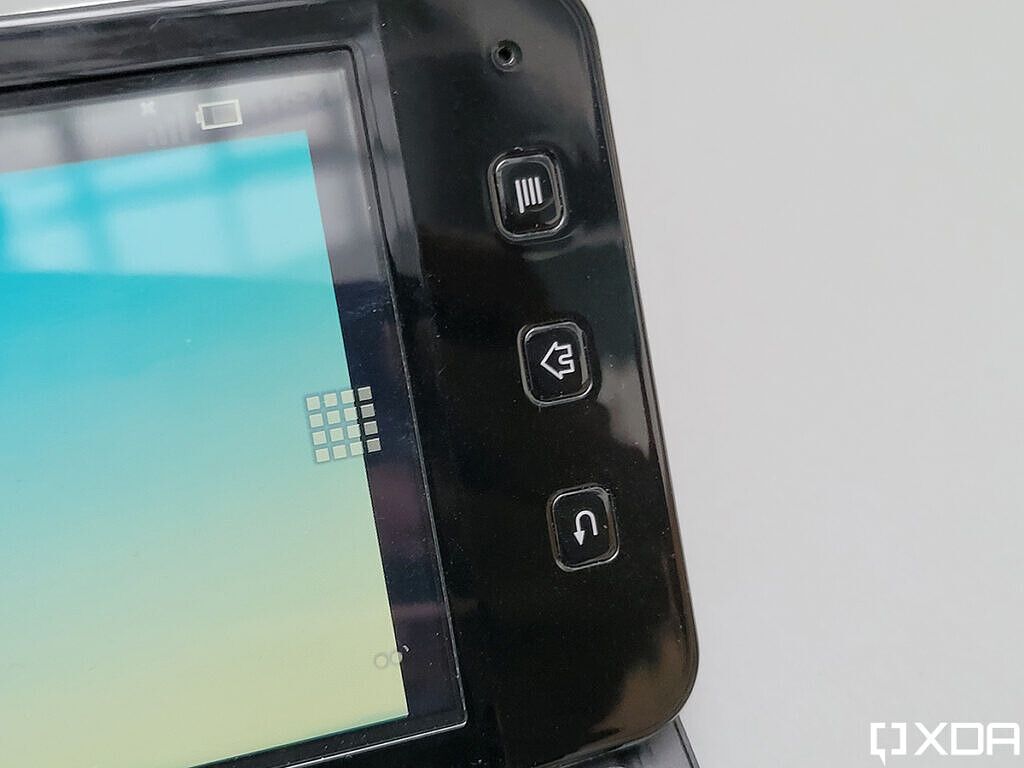
Sony Ericsson VAIO prototyle Android buttons close up

It runs on Android 2.1 Eclair and, as such, it features physical back, home, and menu keys underneath the display. But none of this is unusual for an Android smartphone from that era.

Sony Ericsson VAIO prototyle side hinge half open

What is unusual, however, is the prototype’s two-stage hinge mechanism that first slides the display out flat and then inclines it up to reveal a full-sized keyboard with comfortable spacing and great travel.

Sony Ericsson VAIO prototyle keyboard close up

And despite the space constraints, it even features a second set of Android buttons to the left of the spacebar, a dedicated search button, and a function key.

Sony Ericsson VAIO prototyle keyboard close up Android buttons

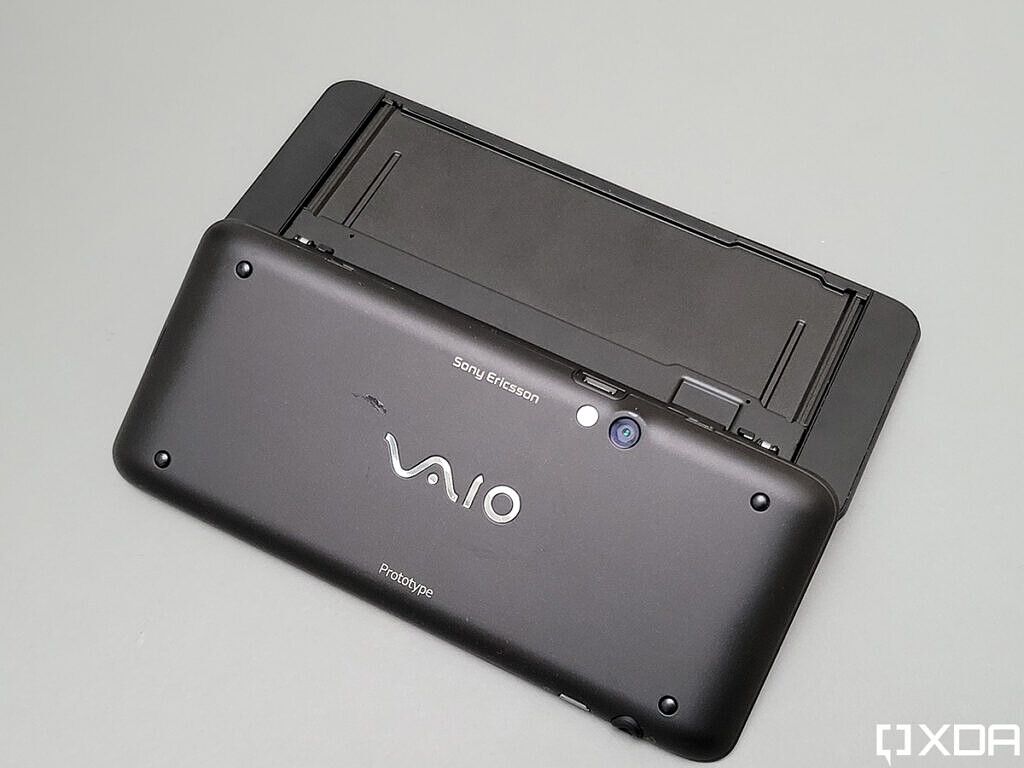
Over on the back, the Sony Ericsson VAIO prototype features prominent VAIO branding bang in the center, a small Sony Ericsson logo at the top next to the single rear-facing camera and flash, and a Prototype badge at the bottom.

Sony Ericsson VAIO prototyle back 1

It even has four rubber feet at the bottom for traction which would really come in handy while using it on a desk. For connectivity, the device looks to have a headphone jack on the leading edge and a mini USB port on the trailing edge.

Much like the Xperia Play 2, this Sony Ericsson VAIO prototype was way ahead of its time. In my opinion, if Sony were to launch a similar design today, professionals who often have to work on the go would line up to purchase the smartphone. And with Android now boasting a much more mature ecosystem of apps and features, the smartphone would have a stronger chance of carving a niche in today’s smartphone market than it did back in the day.

What do you think of this Sony Ericsson VAIO prototype? Would you consider purchasing an Android smartphone with a physical keyboard? Or do you think this form factor and the physical keyboard aren’t as relevant anymore? Share your thoughts in the comments section below.

The post Exclusive: This is the Sony Ericsson VAIO smartphone that never came to be appeared first on xda-developers.


from xda-developers https://ift.tt/382VBXD
via IFTTT